1 Platform Overview
The User Manual is available for Max and Standard. Use the tabs below to switch between editions.
- Max
- Standard
The Palm Application Platform is a unified management and application platform for Palm Scan services. It consists of the Admin Console, mobile clients, Palm Verification Devices, and an optional Host. The platform covers business processes such as tenant and device configuration, user registration, Palm Scan verification, Additional Verification, and result queries, helping administrators enable services, manage daily operations, and manage devices.
1.1 Platform Components
Admin Console
The Admin Console is accessed through a web browser. It provides centralized management of tenants, users, devices, scenes, and verification rules, and allows administrators to view device operating status and verification results. This manual uses the Indonesia production environment as the trial entry point. Contact kreiswu or kevinnzheng to obtain a trial account. For customer private deployments, use the access URL, login account, and initial password provided with the actual delivery.
Mobile Clients
Mobile clients include a mobile App and H5 pages. The trial entry points are as follows:
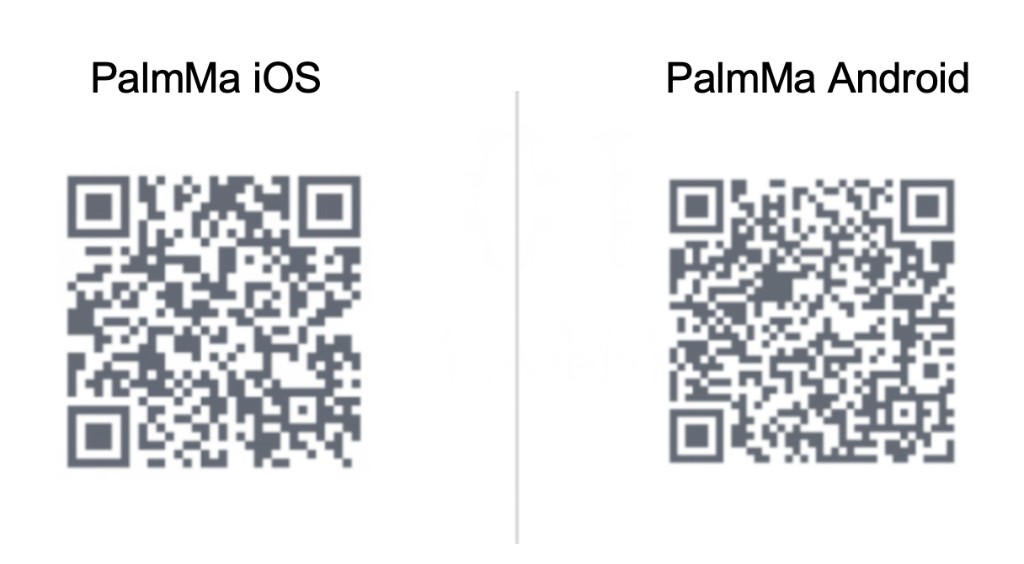
- PalmMa demo App: Used to try Mobile Palm Registration, palm management, palm recognition, and palm verification. See the following image for the download entry point.
- Mobile Palm Registration H5: Used to complete Mobile Palm Registration preregistration directly in a mobile browser. The trial URL is https://app.intl.palm.tencent.com/palm_h5.
- Device Scan QR Registration H5: Used to enter registration information and generate a registration QR code. The trial URL is https://app.intl.palm.tencent.com/local_h5/register.
- Device QR Code Additional Verification H5: Used to enter additional verification information and generate an additional verification QR code. The trial URL is https://app.intl.palm.tencent.com/local_h5/login.
The preceding App and H5 pages are examples from the Indonesia production environment and are provided only for feature trials and integration reference. To implement Mobile Palm Registration in customer services, customers can integrate the Mobile Palm Registration App SDK or H5 SDK according to the Palm Developer documentation and develop the corresponding features. For production projects, use the pages, processes, and environment configurations from the customer's actual integration. Device Scan QR registration QR codes and device QR code additional verification QR codes serve different purposes and cannot be used interchangeably.
Palm Verification Device
The Palm Verification Device connects to the Palm Application Platform, completes device authorization and activation for the Admin Console environment, and performs on-site operations such as palm capture, palm activation, Palm Scan verification, additional verification, and result reporting. This manual includes usage tutorials for the M3 and M4 devices.
Host
The Host is an optional supporting registration tool that applies only to M4. M3 does not support Host registration. Administrators can enter user information and initiate registration in Host Demo, after which users complete palm capture on the device. Host Demo can be downloaded for the applicable computer operating system from Host Demo Download on the PalmAI Enterprise KYC website. The Host Demo and related configurations in this manual are based on the Indonesia production environment and are provided only for feature trials and integration reference. Customers can refer to the Palm Developer documentation, go to API Reference > Device-Side, and integrate the Host communication protocol or supporting SDK to develop their own Host application. A Host is not required for the quick trial. For details, see "6.4.4 Host Registration" in the User Manual for M4.
1.2 Platform Workflow
The administrator first configures the tenant, devices, scenes, and rules in the Admin Console, and then prepares user information based on the scene mode. After users register through a device, mobile App, H5 page, or Host, they can perform Palm Scan verification on the device. The system processes verification requests according to the Scene Strategy and verification rules, triggers Additional Verification when necessary, and uploads the verification results to the Admin Console. Device authorization grants access to Palm Scan capabilities, while device activation connects the device to the current Admin Console environment. These are independent processes.
The Palm Application Platform is a unified management and application platform for Palm Scan services. It consists of the Admin Console, mobile clients, Palm Verification Devices, and an optional Host. The platform covers business processes such as tenant and device configuration, user registration, Palm Scan verification, and result queries, helping administrators enable services, manage daily operations, and manage devices. The Palm Database limit for each tenant is 50,000.
1.1 Platform Components
Admin Console
The Admin Console is accessed through a web browser. It provides centralized management of tenants, users, devices, scenes, and verification rules, and allows administrators to view device operating status and verification results. This manual uses the Indonesia production environment as the trial entry point. Contact kreiswu or kevinnzheng to obtain a trial account. For customer private deployments, use the access URL, login account, and initial password provided with the actual delivery.
Mobile Clients
Mobile clients include a mobile App and H5 pages. The trial entry points are as follows:
- PalmMa demo App: Used to try Mobile Palm Registration and palm management. See the following image for the download entry point.
- Mobile Palm Registration H5: Used to complete Mobile Palm Registration preregistration directly in a mobile browser. The trial URL is https://app.intl.palm.tencent.com/palm_h5.
- Device Scan QR Registration H5: Used to enter registration information and generate a registration QR code. The trial URL is https://app.intl.palm.tencent.com/local_h5/register.
The preceding App and H5 pages are examples from the Indonesia production environment and are provided only for feature trials and integration reference. To implement Mobile Palm Registration in customer services, customers can integrate the Mobile Palm Registration App SDK or H5 SDK according to the Palm Developer documentation and develop the corresponding features. For production projects, use the pages, processes, and environment configurations from the customer's actual integration.
Palm Verification Device
The Palm Verification Device connects to the Palm Application Platform, completes device authorization and activation for the Admin Console environment, and performs on-site operations such as palm capture, palm activation, Palm Scan verification, and result reporting. This manual includes usage tutorials for the M3 and M4 devices.
Host
The Host is an optional supporting registration tool that applies only to M4. M3 does not support Host registration. Administrators can enter user information and initiate registration in Host Demo, after which users complete palm capture on the device. Host Demo can be downloaded for the applicable computer operating system from Host Demo Download on the PalmAI Enterprise KYC website. The Host Demo and related configurations in this manual are based on the Indonesia production environment and are provided only for feature trials and integration reference. Customers can refer to the Palm Developer documentation, go to API Reference > Device-Side, and integrate the Host communication protocol or supporting SDK to develop their own Host application. A Host is not required for the quick trial. For details, see "6.4.4 Host Registration" in the User Manual for M4.
1.2 Platform Workflow
The administrator first configures the tenant, devices, scenes, and rules in the Admin Console, and then prepares user information based on the scene mode. After users register through a device, mobile App, H5 page, or Host, they can perform Palm Scan verification on the device. The system processes verification requests according to the Scene Strategy and verification rules and uploads the verification results to the Admin Console. Device authorization grants access to Palm Scan capabilities, while device activation connects the device to the current Admin Console environment. These are independent processes.