CapitaLand Pilots Palm Recognition Office Access with PalmAI
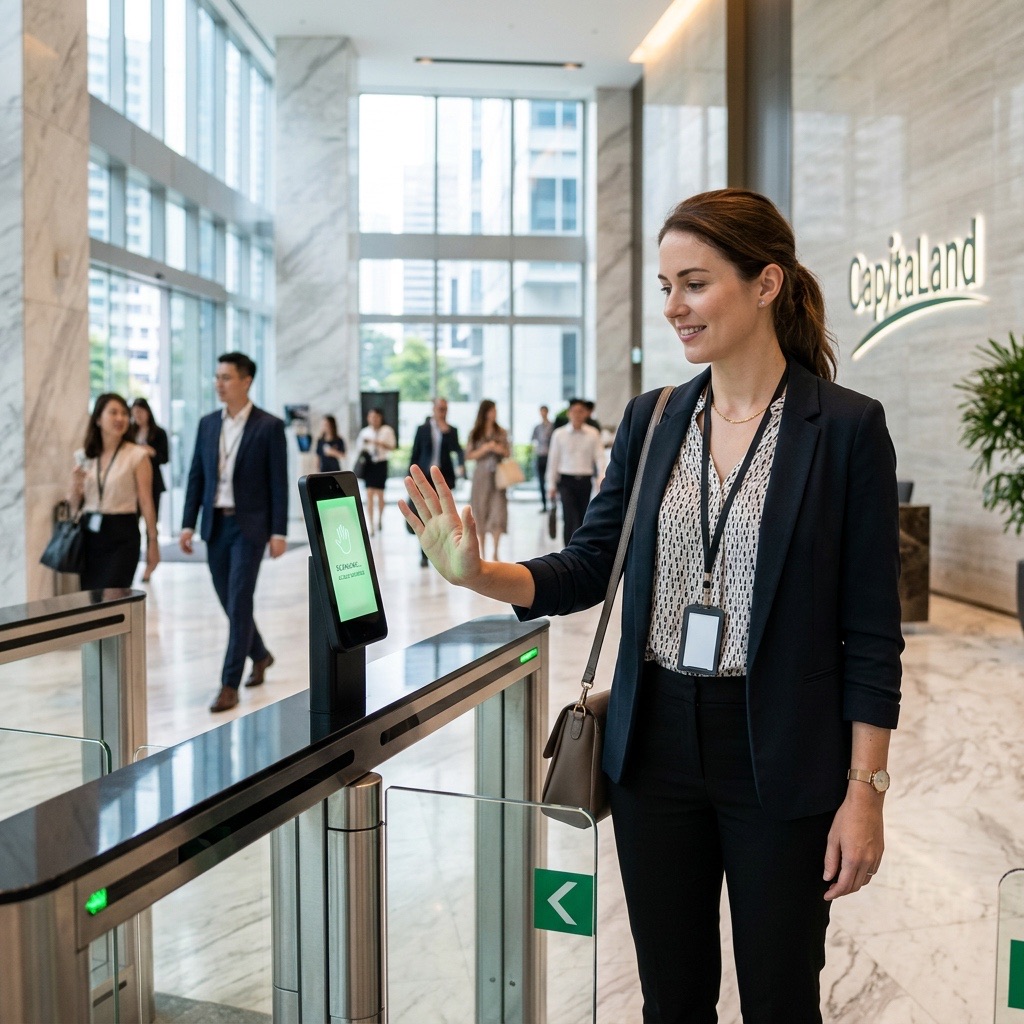
Palm recognition is an AI-powered contactless identity technology that combines palm print and palm vein biometrics. CapitaLand, Asia's largest real-estate group, partnered with Tencent PalmAI to pilot palm-based office access — letting tenants self-enroll their palm at the front desk and pass gates and elevators with a single contactless wave, on a fully on-premise deployment.
At a Glance
| Dimension | Detail |
|---|---|
| Client | CapitaLand |
| Industry | Real Estate / Smart Building & Office |
| Region | Singapore |
| Challenge | Provide tenants and visitors with secure, contactless access across gates and elevators — without storing facial data and without retrofitting building Wi-Fi |
| Solution | Tencent PalmAI Standard, on-premise deployment with 1× M4 self-enrollment device and 11× M3 gate/elevator scanners |
| Key Result | Self-service palm enrollment at reception + card-free, contactless palm access at gates and elevators in one office tower |
| Privacy posture | Fully internal-network deployment; no facial recognition, palm templates only |
Why Card-and-Face Access No Longer Fits a Modern Office Tower
CapitaLand is one of Asia's largest real-estate groups, with a global portfolio of office towers, business parks, retail malls and integrated developments. Like many landlords of premium office space, CapitaLand sees daily access friction stack up across three populations: long-term tenants, occasional visitors, and contractors who arrive without an issued credential.
In a typical Grade A office tower, the existing toolkit is showing its age.
Before PalmAI:
| Pain point | Operational impact |
|---|---|
| Lost, forgotten or shared access cards | Reception calls, replacement card cost, "tailgating" by people who borrowed someone's badge |
| Visitor and contractor onboarding | Manual front-desk registration with QR code or temporary card, queues at peak hours |
| Facial recognition at the gate | Tenant pushback on storing face data, regulatory scrutiny under Singapore's PDPA |
| Cloud-only access systems | IT and tenant security teams uncomfortable putting building access on the public internet |
| Multiple credential systems | Separate logic for gates, lifts, meeting rooms — hard to keep in sync |
For a landlord whose tenants include banks, professional services and tech firms, the bar for an "upgrade" is high: it must be more secure than a card, more private than a face, and acceptable to the tenant's own IT team.
→ Explore PalmAI's smart building and office solutions
Why CapitaLand Chose Palm Recognition Over Cards, Fingerprint and Face
CapitaLand evaluated a range of access modalities before piloting palm recognition with Tencent PalmAI. The decision criteria were grounded in office-tower realities: privacy, tailgating control, unattended operation, and IT team comfort with the deployment topology.
Palm Recognition vs Alternatives for Office Building Access
| Criterion | Card / Badge | Fingerprint | Face Recognition | Palm Recognition |
|---|---|---|---|---|
| Privacy posture | Identifier on the card only | Surface biometric, stored locally | Highly identifying biometric, sensitive under PDPA | Palm not used as a public identifier; opt-in only |
| Tailgating resistance | Low — cards are easily lent or "tapped through" for a friend | Medium — finger must be presented per person | Medium — but raises consent concerns at the gate | High — each person presents their own palm, no transfer possible |
| Hygiene / contactless | Tap on reader (touch) | Touch sensor required | Contactless | Contactless, no surface contact |
| Unattended onboarding | Cards must be issued by reception | Enrollment requires staff support | Camera capture often needs staff guidance | Self-service enrollment at a kiosk, no staff needed |
| Network topology | LAN-only or cloud | Local DB | Often cloud + camera array | Runs on a single low-spec on-premise server, fully internal network |
| Tenant IT acceptance | Familiar but weak | Mixed | Often blocked by privacy review | Easier sign-off — no facial data, fully on-prem |
Where palm recognition is not the right fit: For one-time event visitors who will never return to the building, a temporary QR or visitor pass remains a lighter solution than full enrollment. Palm scanners also need to be installed at the right ergonomic height to be usable for shorter and taller users alike.
Based on this evaluation, CapitaLand selected Tencent PalmAI for its first palm access pilot:
- Privacy-aligned for tenant IT review — no facial data is captured or stored; only encrypted palm templates
- Self-service enrollment — tenants register their own palm at a kiosk, removing reception bottlenecks
- On-premise by design — the system runs on a single low-spec CPU server inside the building's internal network; no public internet exposure
- Per-building deployment — each building can run its own isolated stack, matching how building security is operated in practice
- Reuse one credential across gate and lift — the same palm enrollment works for ground-floor gates, elevator dispatching, and tenant floors
Inside the CapitaLand × PalmAI Pilot: Self-Enrollment, Gates and Elevators
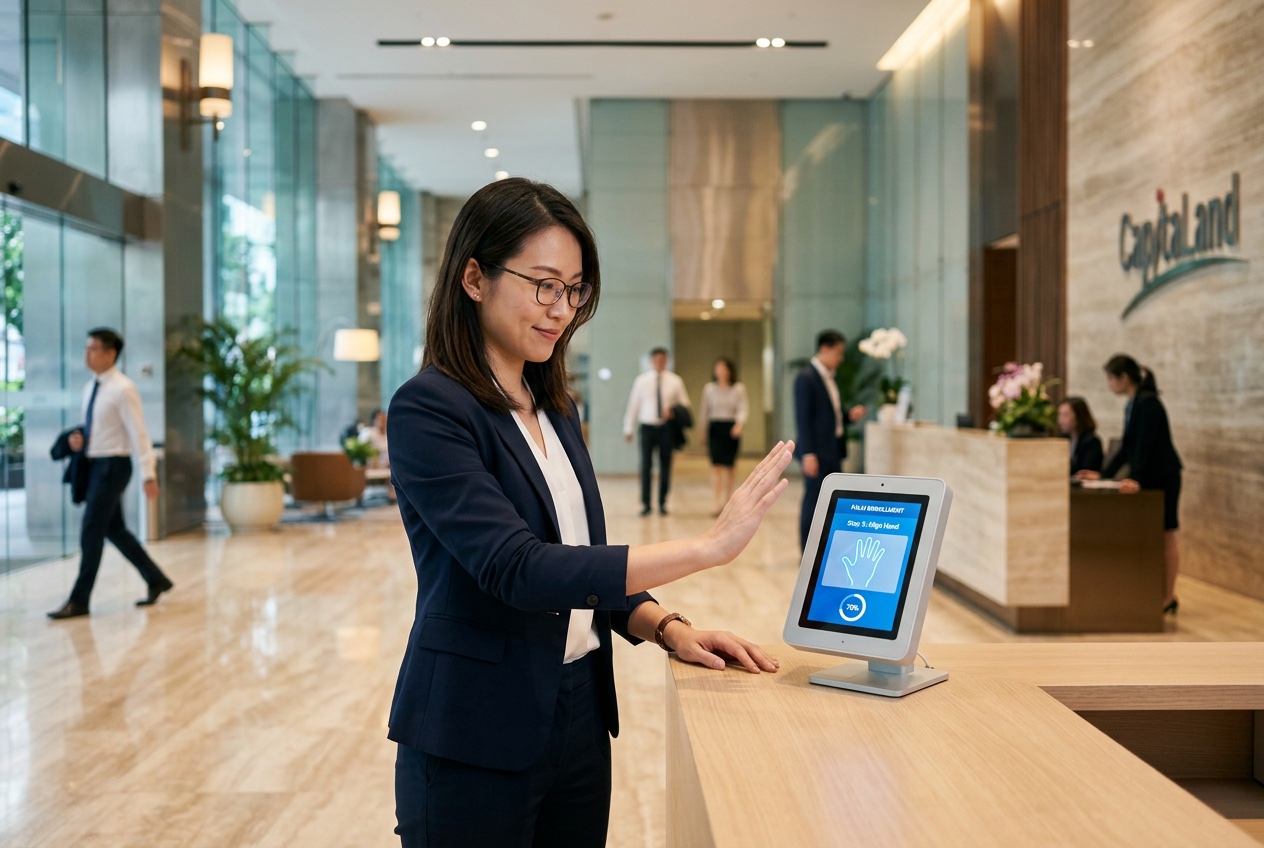
The first phase of the deployment lives inside one CapitaLand office tower in Singapore. The full system is intentionally compact, because in real building operations a smaller blast radius is a feature.
Solution overview:
| Component | Detail |
|---|---|
| Service tier | Tencent PalmAI Standard, deployed on-premise |
| Devices | 1× M4 (lobby self-enrollment kiosk) + 11× M3 (turnstile gates and elevator panels) |
| Server footprint | Single low-spec CPU server, internal-network only |
| Biometric modality | Palm print + palm vein (dual-modal) |
| Enrollment model | Tenant self-service at the lobby M4, no reception staff required |
| Verification points | Ground-floor gates (palm wave to pass) + elevator car / lobby (palm wave to authorize floor access) |
| Network topology | Fully internal — no public internet, no cloud sync |
The tenant journey:
1. Self-enrollment at the lobby
A new tenant or contractor walks up to the M4 device at reception, follows on-screen prompts, and enrolls their palm in well under a minute. Crucially, no front-desk staff intervention is required — enrollment scales with the number of devices, not with reception headcount.
2. Contactless access at the gate
At the turnstile, the tenant simply waves their hand over an M3 scanner. There is no card to lose, no phone to unlock, and no face captured into a server. The barrier opens within roughly a second.
3. Authorized access at the elevator
Once past the gate, the same palm credential authorizes elevator access — the system can route the tenant to permitted floors only, replacing the older logic of "card unlocks the lift, then the lift trusts whoever is inside it."
4. Privacy by deployment, not just policy
The entire pilot runs on the building's internal network on a single low-spec server. Palm data never leaves the building, no facial recognition is involved, and access logs stay under the same governance the tenant's IT team already trusts.
What Changed Inside the Building
| Dimension | Before | After |
|---|---|---|
| Credential management | Cards issued, lost, replaced, shared | Each tenant enrolls their own palm once |
| Tailgating risk at the gate | Anyone holding a valid card can tap | Each person must present their own palm |
| Visitor onboarding | Manual reception registration | Self-service kiosk enrollment |
| Privacy concerns from tenants | Face capture often blocked by tenant IT | No face data; only encrypted palm templates |
| Network exposure of the access system | Often cloud-connected | Fully on-premise, internal network only |
| Credential per scenario | One for gate, another for lift, another for meeting rooms | Single palm credential reusable across gates and elevators |
What Building Operators Should Evaluate Before Rolling Out Palm Access
Palm recognition is not a drop-in replacement for cards in every building, and CapitaLand's pilot is a useful frame for what operators should think through first.
- Tenant IT review — confirm that on-premise deployment, encrypted templates, and "no facial data" can be documented in a way the tenant's security team can sign off on
- Ergonomic placement — install M3 scanners at a height that works for the 5th-to-95th percentile of users; design for a natural one-handed wave, not a stretched-out reach
- Enrollment SLA — define how a brand-new tenant gets enrolled on day one, and what fallback exists if the kiosk is busy
- Visitor and contractor flow — decide which categories enroll fully and which keep using temporary QR / visitor passes
- Floor-level authorization model — design how palm credentials map to floors, meeting rooms and after-hours access, so the lift logic is auditable
- Per-building isolation — for multi-asset portfolios, decide whether each building runs its own stack (CapitaLand's current pattern) or a regional one, and document the reasoning
These questions matter as much as the underlying biometric accuracy — they decide whether the rollout is sustainable across a portfolio.
Where Palm Access Fits in the Smart Building Roadmap
Workplace access is moving from "what credential do you carry" to "who are you, and what are you authorized to do here." Cards solved the first half of that question; palm recognition closes the second half without requiring a face scan in every lobby. CapitaLand's pilot shows what that shift looks like in a real Grade A office tower: self-service enrollment, on-premise deployment, and a single contactless credential that travels from the gate to the elevator. As tenants increasingly evaluate buildings on digital experience and privacy posture, palm-based access becomes a credible default for new and refurbished office assets.
→ Ready to bring palm recognition to your office portfolio? Use the contact form on this page to discuss a smart building access deployment for your tenants.
FAQ
How does palm recognition work for office building access at CapitaLand?
Palm recognition at the CapitaLand pilot uses Tencent PalmAI's dual-modal verification — combining palm print and palm vein patterns — to identify each tenant in roughly a second. Tenants enroll their own palm at a self-service M4 kiosk in the lobby, and from then on they pass through ground-floor gates and elevator readers by waving their hand over an M3 scanner. No card, badge, or facial scan is required.
Is palm recognition more private than face recognition for office tenants?
Yes, in two concrete ways. First, the system does not capture or store facial data — only palm print and palm vein templates, which are encrypted feature vectors rather than images. Second, the deployment runs on the building's internal network on a single on-premise server, so palm data never leaves the building. This is significantly easier for tenant IT teams to approve under PDPA and similar privacy regimes than a cloud-based face recognition system.
How does palm access compare to cards, fingerprint and face for tailgating control?
Cards are easy to share, lend or "tap through" for a colleague, which is the most common tailgating risk in modern office towers. Fingerprint requires touching a sensor and works only one user at a time, but enrollment usually requires staff support. Face recognition is contactless but raises privacy and consent concerns at the gate. Palm recognition is contactless, requires each person to present their own palm individually, and supports self-service enrollment — which is why CapitaLand selected it for the pilot.
Can the palm recognition system run without cloud connectivity?
Yes. CapitaLand's deployment is fully on-premise — Tencent PalmAI Standard runs on a single low-spec CPU server inside the building's internal network, with 1× M4 enrollment device and 11× M3 gate and elevator scanners. The system does not require cloud connectivity for day-to-day verification, and palm data does not leave the building. This is the same pattern recommended for tenants and IT teams who are uncomfortable putting access control on the public internet.
How long does it take to deploy PalmAI palm access in a smart building?
Deployment time depends on the building's existing turnstile and elevator infrastructure and on the IT review cycle for the on-premise stack. The CapitaLand pilot uses a deliberately compact footprint — one M4, eleven M3 scanners, one server — which is the kind of unit that can be replicated per building rather than as a portfolio-wide cloud rollout. Use the contact form on this page to discuss timelines for your specific building.
Related Resources
Other PalmAI access and identity deployments:
- How a national sports venue went fully hands-free with palm recognition — multi-touchpoint palm access (entry, lockers, on-site spend) at a public venue
- How palm recognition removed the digital barrier for Singapore's seniors — same market (Singapore), self-service enrollment for non-tech-native users
Decision-support reading:
- Read: Palm Recognition vs Face Recognition — Privacy and Security Compared — why CapitaLand-style "no facial data" deployments fit tenant IT review
- Read: Palm vs Face vs Fingerprint vs Iris — Which Biometric Is Most Secure? — full four-modality comparison for building access decisions
→ Browse all PalmAI success stories
About Tencent PalmAI
Tencent PalmAI is an AI-powered palm recognition service that combines palm print and palm vein dual-modal identification. Developed by Tencent's YouTu Lab and AI Lab — with 20+ top conference publications, 90+ granted patents, and 400+ pending — PalmAI powers contactless identity verification, payment, and access control for enterprises across retail, finance, healthcare, and smart building sectors worldwide. The CapitaLand pilot demonstrates how palm recognition can replace cards, fingerprints and face scanners in office building access without requiring cloud connectivity or facial data capture.